Auditor
What the read-only Auditor sees: the audit log, governance reports, the access review and the tamper-evident audit export.
Last updated 2026-10-03
On this page
Who this role is#
The Auditor (or compliance viewer) checks that the firm is following its own rules. The role is read-only: you cannot create, change or approve anything, and you do not work on matters or open client documents.
New here? Follow Getting started as an Auditor.
What you see on Home#
There is no dashboard for this role. Home shows a message that your role has no home page. Go straight to Exceptions (the Governance tab) or to Settings.
Your menu#
Home, Exceptions, and under the extra items Notifications, Settings, Profile. In Settings you are offered Audit log, Access review and Appearance.
What you can do#
- Read the Audit log: search it, filter by category, action, person, matter and date, open an entry with View. Use Verify chain to prove nothing was altered, and Write checkpoint to record the current state.
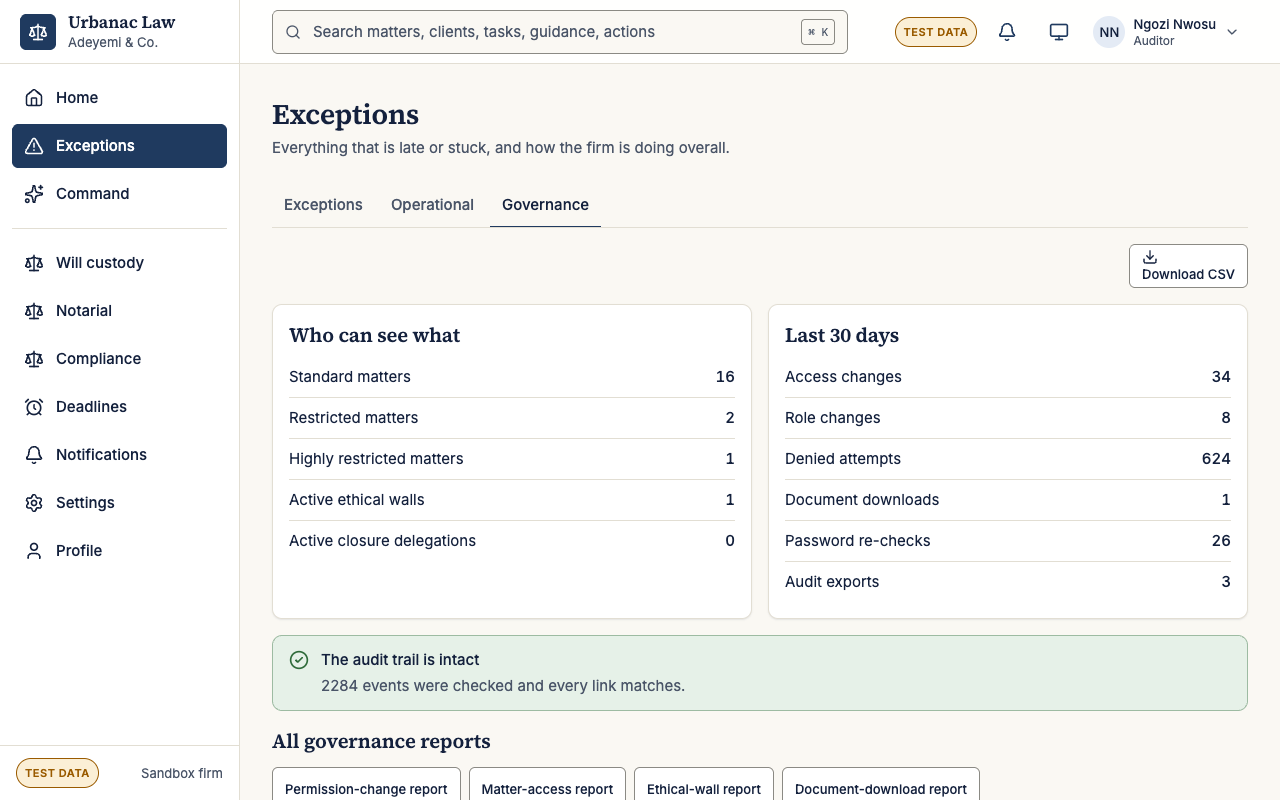
- In Exceptions, open the Operational and Governance tabs: who can see what, access and role changes, denied attempts, document downloads, PIN re-checks, audit exports, and whether the audit trail is intact. Download CSV is on the tables.
- Click Export audit trail on the Governance tab for the tamper-evident file. The file carries a fingerprint so anyone can check it later. The export itself is recorded in the audit log.
- Read the quarterly Access review (who confirmed whose access, and when).
What you cannot do#
- Change anything: no confirming or revoking access in the Access review, no settings, no users, no tasks, no matters.
- Download client documents unless the firm explicitly gives you a way to. Governance reports show counts and identifiers, not case details.
- Read the notification inbox (your role does not include it).
When you will be asked for your PIN again#
Exporting the audit trail, and adding or removing your own passkey, authenticator app or trusted device, open a box titled Confirm it is you. Type your PIN and press Confirm; it stays valid for 10 minutes. The box appears after you press Export audit trail, and nothing is exported until you confirm.
When something is greyed out#
Almost every control that changes data is absent for your role. If you open a page for another role you see a message saying who it is for. If the Verify chain result says "Mismatch found", tell the Managing Partner immediately and keep the exported file.
Where to go next#
Security and privacy · Reports · Backup and recovery · Sign-in and two-factor
Something unclear or out of date? Tell your Operations Administrator, or go back to the manual home.