Partner
What a Partner sees, can do, and is asked to confirm, and what stays with the Managing Partner.
Last updated 2026-10-03
On this page
Who this role is#
A Partner supervises matters, decides conflicts and client acceptance, approves final documents, issues invoices and reviews and closes work. Like the Managing Partner you can open every matter in the firm, unless a matter has been restricted or walled off from you (see Security and privacy). You do not manage users or firm settings.
New here? Follow Getting started as a Partner.
What you see on Home#
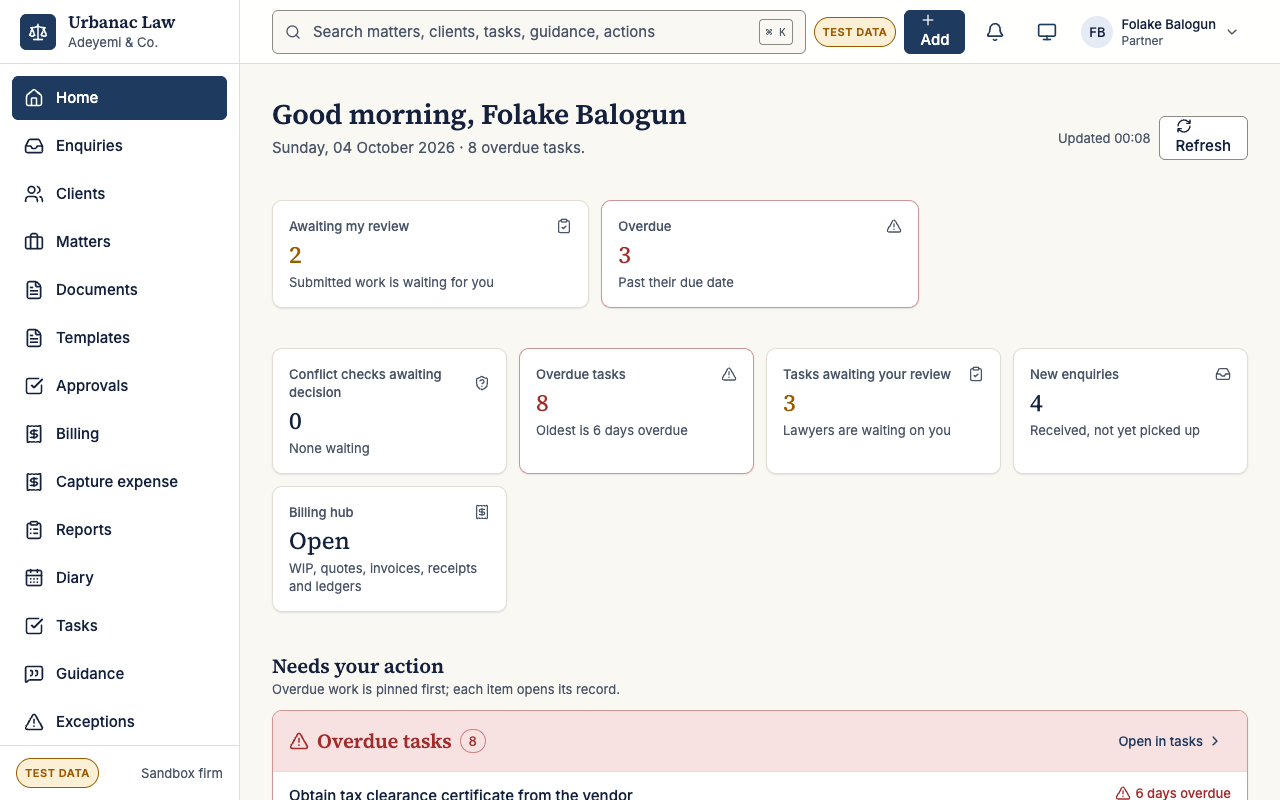
The same Partner Home as the Managing Partner: Awaiting my review, Overdue, Guidance awaiting me, then Conflict checks awaiting decision, Overdue tasks, Tasks awaiting your review, New enquiries, Billing hub, and the sections Needs your action, Diary and deadlines, Matters and Recent activity.
Your menu#
Home, Enquiries, Clients, Matters, Documents, Templates, Approvals, Billing, Capture expense, Reports, Diary, Tasks, Guidance, Exceptions, Command, and under the extra items Will custody, Notarial, Compliance, Deadlines, Notifications, Settings, Profile.
What you can do#
- Decide conflicts, record the client-acceptance decision, record scope and fees, and open a matter once every gate has passed (or open it urgently with a reason and an end date).
- Assign staff to matters, grant or remove matter access, set a matter's access mode and create or lift ethical walls.
- Approve final documents, approve templates, mark a version Executed Final, apply your seal if you hold one.
- Close a task, return it for rework, approve it, reopen it with a reason, reassign or cancel it. Answer, escalate and close guidance requests.
- Approve quotes, invoices and expenses, issue invoices, write off balances, record receipts, transfer client money and sign off reconciliations.
- See the audit log, run governance and operational reports, open the Exceptions view.
- Invite a client to the portal.
- Import tasks from a CSV file.
What you cannot do#
- You cannot add or deactivate users, change roles or issue temporary PINs: those are the Managing Partner's.
- Settings screens are read-only for you. You can look at the firm profile and the sign-in security policy; only the Managing Partner can change them.
- You cannot export the audit trail in tamper-evident form, run the Access review, or manage Webhooks and API, Teams membership or Work SLAs.
- You cannot reset a colleague's second sign-in step.
- You cannot overwrite an Executed Final document or edit an archived matter.
When you will be asked for your PIN again#
A box titled Confirm it is you opens for: approving a final document (valid 15 minutes), applying your seal, bulk export, approving permanent deletion, issuing an invoice, writing off a balance, back-dating a receipt, issuing a credit note, transferring client money, signing off a reconciliation, creating or lifting an ethical wall, and adding or removing your own sign-in methods. Type your PIN and press Confirm; you are not asked again for 10 minutes.
When something is greyed out#
The button is greyed out or missing when your role does not include the action (for example Change role is not in your menu), when you are not allowed into that matter, or when the record's state forbids it (archived matter, Executed Final document, gate not passed). A short reason is shown where the screen can give one.
Where to go next#
Something unclear or out of date? Tell your Operations Administrator, or go back to the manual home.