Paralegal
What a Paralegal sees and can do on assigned matters, and which steps go to a lawyer instead.
Last updated 2026-10-03
On this page
Who this role is#
A Paralegal supports the lawyers on the matters they are assigned to: preparing bundles, chasing documents, updating checklists, court and registry records, and keeping the diary. You do not see privileged or partner-only material, and you do not handle finance beyond recording time and expenses. You see only matters you are assigned to.
New here? Follow Getting started as a Paralegal.
What you see on Home#
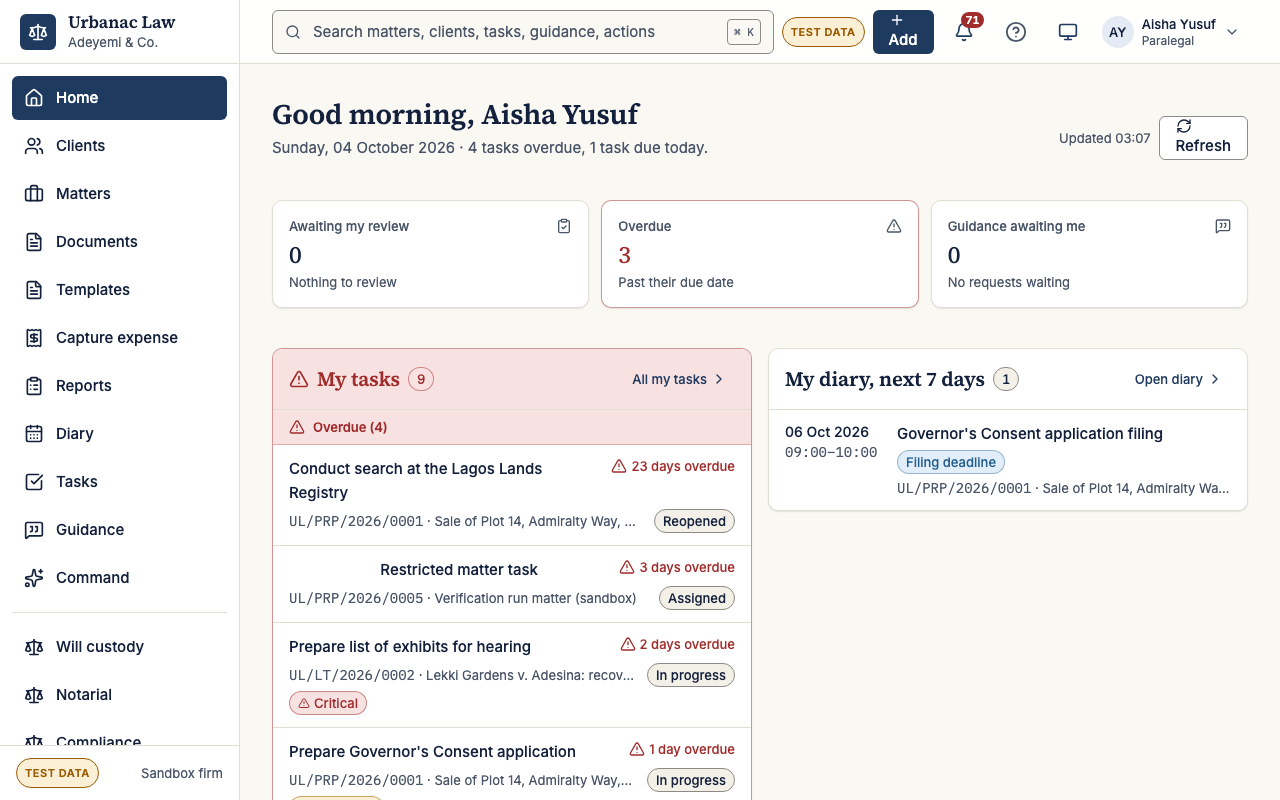
The Staff Home: Awaiting my review, Overdue and Guidance awaiting me cards, then My tasks, My diary, next 7 days, Waiting on others, My matters, Required uploads and Documents I worked on recently.
Your menu#
Home, Clients, Matters, Documents, Templates, Capture expense, Reports, Diary, Tasks, Guidance, Command, and under the extra items Will custody, Notarial, Deadlines, Notifications, Settings, Profile.
What you can do#
- Accept tasks, Start work, mark Waiting on someone or Mark as blocked, and Submit for review when done. Create tasks on your matters and update them.
- Tick KYC checklist items, upload documents and new versions, generate a draft from an approved template and check a document for errors and gaps.
- Create and update diary entries, add matter notes, log communications.
- Record time and expenses (Capture expense) on your matters.
- Raise a guidance request to a senior (New request) and confirm the answer.
- View clients and parties, view templates, view e-signature requests and their progress.
- Create an online payment link for an issued invoice, and queue an email, SMS or WhatsApp message to a client when one of the lawyers asks you to.
What you cannot do#
- Close a task. Send it for review; a Managing Partner, Partner or Senior Associate approves and closes it.
- Create or edit client records, reveal a masked NIN or BVN, write a document from a blank page or with AI, edit a template, or send a document for e-signature (you can follow its progress).
- Change a document's classification or folder.
- Anything in invoices, quotes, receipts, ledgers or the Billing hub.
- Decide conflicts, open matters, approve anything.
- See matters you are not assigned to, or material above your clearance level.
When you will be asked for your PIN again#
Only when you add or remove your own passkey, authenticator app or trusted device. A box titled Confirm it is you opens: type your PIN and press Confirm.
When something is greyed out#
A missing Close task is by design: use Submit for review. A greyed-out button on a matter usually means you are not assigned to it, or it is archived (read-only). If you need to do something that is not in your role, raise a guidance request or ask the responsible lawyer.
Where to go next#
Tasks · Guidance requests · Diary and deadlines · Documents and templates · Time
Something unclear or out of date? Tell your Operations Administrator, or go back to the manual home.